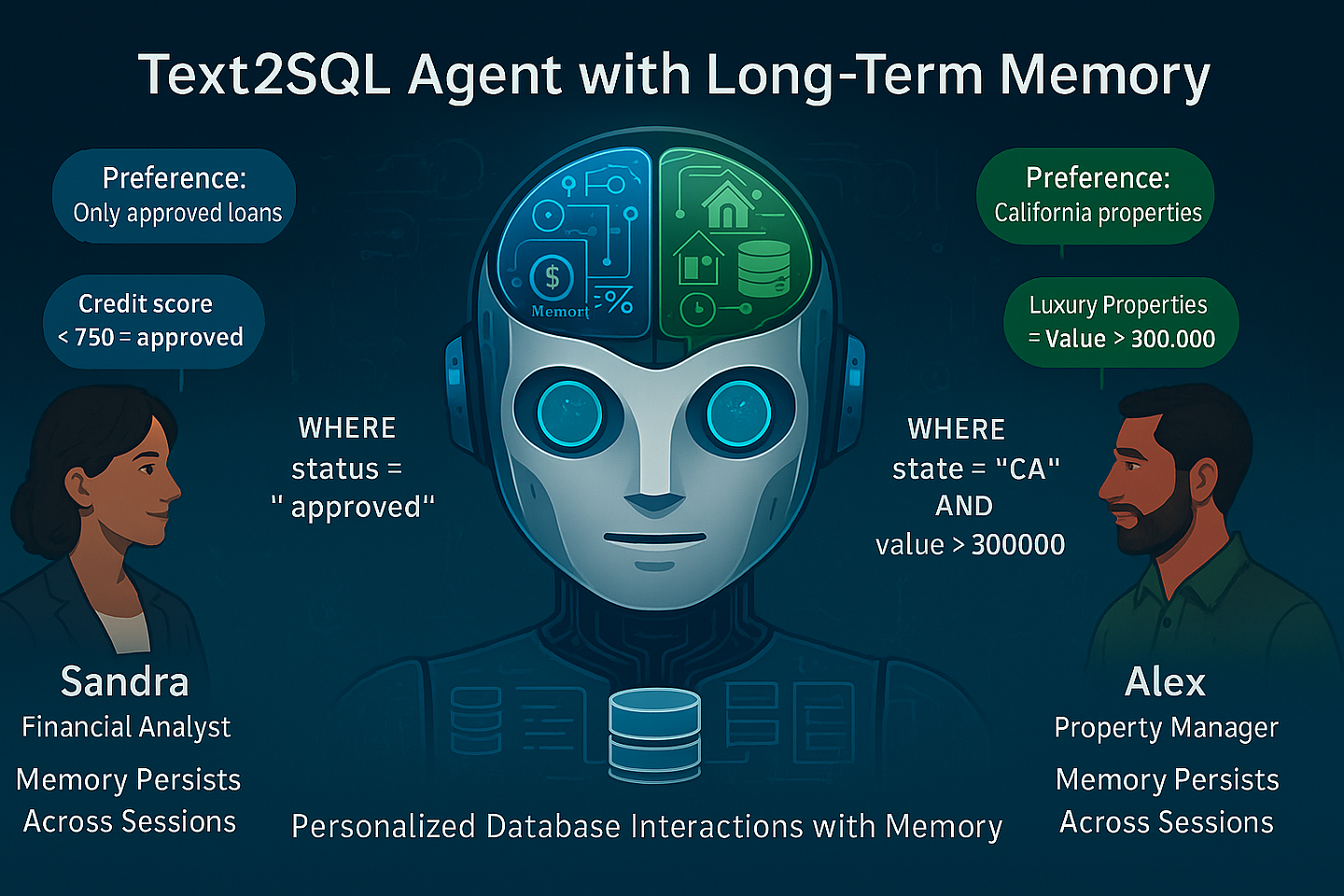
Long-term memory transforms ordinary text2SQL agents into intelligent assistants that remember user preferences across sessions. This tutorial shows how to build a custom implementation inspired by the Mem0 architecture research paper.
Important Clarification
This implementation doesn't use the official Mem0 libraries from https://mem0.ai/research. Instead, I have developed the code from scratch that follows the core principles described in the Mem0 research paper. This gives us more flexibility to adapt the architecture specifically for text2SQL applications.
Why Long-Term Memory Matters for Text2SQL
In traditional text2SQL systems, conversations restart from scratch each session. Preferences, terminology, and context vanish, forcing users to re-educate their AI assistant repeatedly.
This creates a significant cognitive load: financial analysts must specify "only show approved loans" every morning, property managers must redefine "luxury properties" each session, and follow-up questions require constant context refreshing.
Long-term memory transforms this experience by enabling your text2SQL agent to:
- Remember preferences across sessions, automatically filtering by user-specific criteria like "exclude canceled orders"
- Learn domain terminology that bridges user language and database schema, such as "quarterly performers" = "accounts with activity in last three months"
- Maintain context over time, allowing natural follow-ups like "How many of those were from California?" days later
- Build personalized understanding of each user's data interests, improving relevance without explicit instruction
This capability doesn't just enhance experience — it fundamentally changes how people interact with data, creating a more intuitive, human-like interface to complex database information.
What is Mem0 and How it Inspired Our Multi-User Text2SQL Architecture
Mem0 (pronounced "mem-zero") is a memory architecture from mem0.ai that solves limited context window problems through a two-phase system: extracting key information from conversations and updating memory to maintain consistency.
This architecture enhances Mem0 with multi-user memory isolation:
- Complete memory isolation: Each user's preferences stored separately, preventing cross-contamination.
- User-targeted extraction: This Text2SQL Memory component identifies SQL-relevant elements (entities, preferences, terminology, metrics) per user.
- Database integration: Connects personalized memories directly to database schema for accurate SQL generation.
This architecture creates personalized database interfaces where financial analysts automatically filter by preferred metrics, property managers use specialized terminology, and executives reference custom KPIs — all without restating preferences each session.
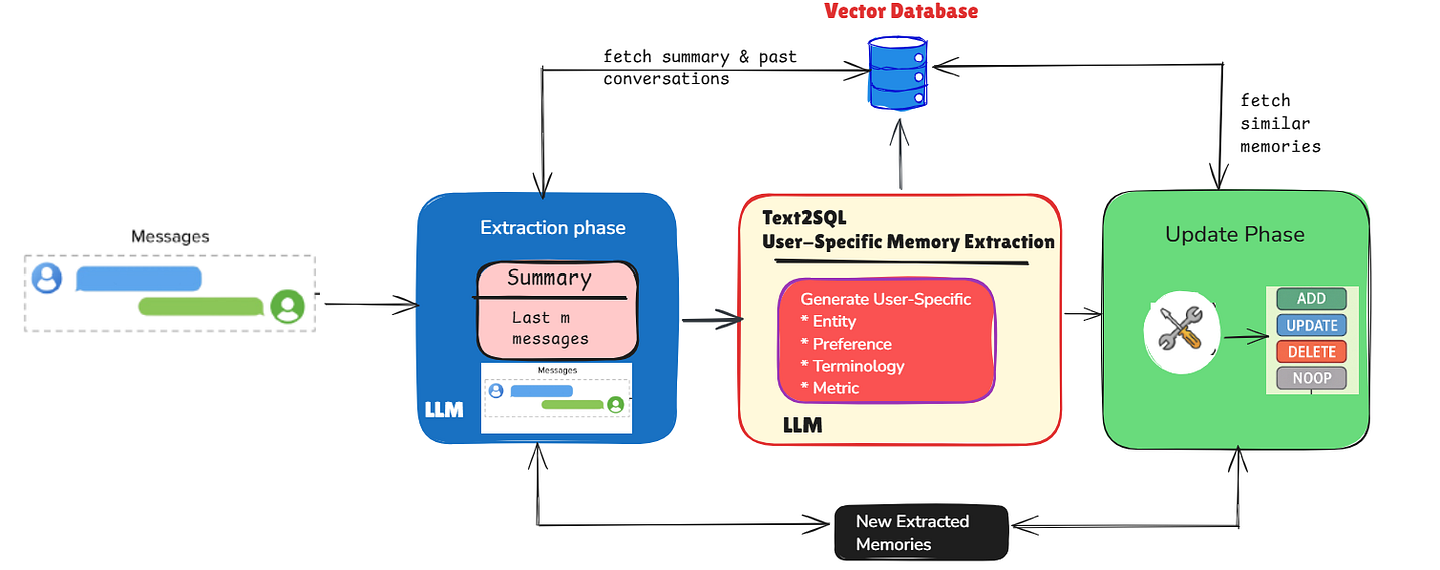
Architecture Overview - Image by Author
Core Components of This Text2SQL + Long-Term Memory Architecture
As illustrated in the diagram, this text2sql long-term memory architecture consists of two primary phases that work in tandem:
1. Extraction Phase (Blue)
The extraction phase captures important information from conversations:
- Message Ingestion: The system processes new message pairs (user question + AI response).
- Context Retrieval: Two sources of context are leveraged:
- A conversation summary that encapsulates the entire history
- The most recent m messages for immediate context
- LLM Processing: An LLM analyzes the conversation context to extract relevant information.
2. Text2SQL User-Specific Memory Extraction (Red)
This specialized component transforms general conversation elements into structured, database-relevant memories:
- Entity Extraction: Identifies database entities (tables, fields) that the user frequently references
- Preference Capture: Records filtering and sorting preferences specific to each user
- Terminology Recognition: Maps user-defined terms to their database equivalents
- Metric Definition: Stores custom calculations or criteria defined by the user
3. Update Phase (Green)
The update phase maintains a consistent knowledge base:
- Similarity Search: The system finds similar existing memories using the vector database
- Operation Classification: The system determines whether to:
- ADD: Create new memories when no similar ones exist
- UPDATE: Enhance existing memories with new information
- DELETE: Remove outdated or contradicted memories
- NOOP: Make no changes when information is redundant
All operations center around the Vector Database at the top, which stores memories with proper user isolation, enabling personalized responses while maintaining privacy between users.
Implementing Multi-User Memory Storage
The heart of our text2SQL memory system is its PostgreSQL-based storage implementation for production deployments.
This implementation leverages the pgvector extension for efficient similarity searches across high-dimensional embedding vectors, handling three critical aspects:
- Vector-based similarity search: Stores embeddings as native vector types, performing cosine similarity operations directly in the database without transferring large vector data.
- User isolation: The
user_idfield serves as both security boundary and performance optimization, ensuring one user's memories don't affect another's. - Hierarchical indexing: HNSW (Hierarchical Navigable Small World) index accelerates similarity searches through a layered graph structure, enabling logarithmic-time approximate nearest neighbor searches.
class PostgresMemoryStore:
    """PostgreSQL-based memory storage with user isolation"""

    def __init__(self, connection_string: str):
        self.conn_string = connection_string
        self.embedding_dim = 1536  # OpenAI embedding dimension
        self._init_db()

    def _init_db(self):
        """Initialize database tables if they don't exist"""
        try:
            import psycopg2

            # Connect to PostgreSQL
            conn = psycopg2.connect(self.conn_string)
            cursor = conn.cursor()

            # Ensure vector extension is loaded
            cursor.execute("CREATE EXTENSION IF NOT EXISTS vector;")
            conn.commit()

            # Create memories table with user_id field
            cursor.execute("""
            CREATE TABLE IF NOT EXISTS memories (
                id SERIAL PRIMARY KEY,
                user_id TEXT NOT NULL,
                content TEXT NOT NULL,
                created_at FLOAT NOT NULL,
                source TEXT,
                metadata JSONB DEFAULT '{}'::JSONB,
                embedding vector(1536)
            );
            """)

            # Create index for vector similarity search
            cursor.execute("""
            CREATE INDEX memories_embedding_idx
            ON memories USING hnsw (embedding vector_cosine_ops);
            """)
The database schema maintains three core tables:
memories: Stores the actual memory content with embeddingsconversation_summaries: Maintains compressed representations of conversation historyrecent_messages: Caches the most recent interactions for immediate context
Connecting to the Data Platform
This API client serves as a flexible connector between our memory system and the underlying data platform. Though our implementation uses Denodo in this example, the architecture is designed to be platform-agnostic and can easily be adapted to work with any database system:
- Snowflake: Extract metadata using Snowflake's Information Schema views
- Databricks: Access catalog metadata through Unity Catalog API
- SQL Server/Oracle/PostgreSQL/MySQL: Generate semantic models through their respective system catalogs
class DenodoAPIClient:
    """Client for interacting with Denodo data virtualization platform"""

    def __init__(self, api_host: str):
        self.api_host = api_host

    async def get_metadata(self, database_name: str,
                          username: str, password: str) -> Dict[str, Any]:
        """Get metadata from data platform"""
        try:
            url = f"{self.api_host}/getMetadata"

            headers = {
                "Content-Type": "application/json",
                "Authorization": self._get_basic_auth_header(username, password)
            }

            params = {
                "database_name": database_name,
                "include_schema": True
            }

            response = requests.get(url, headers=headers, params=params)

            if response.status_code != 200:
                return {"error": f"Status code: {response.status_code}"}

            return response.json()
        except Exception as e:
            return {"error": str(e)}
The Memory Agent Implementation
The Mem0Agent class serves as the cognitive core of our system, orchestrating the extraction, retrieval, and management of memories across user sessions.
class Mem0Agent:
    """Memory agent inspired by Mem0 architecture for text2SQL"""

    def __init__(self, use_postgres: bool = False,
                 postgres_conn_string: str = None):
        # Initialize the appropriate memory store
        if use_postgres and postgres_conn_string:
            self.store = PostgresMemoryStore(postgres_conn_string)
            print("Using PostgreSQL for memory storage")
        else:
            self.store = JSONMemoryStore()

        self.db_schema = None
        self.current_user_id = None
        self.max_recent_messages = 10

    def load_user_context(self, user_id: str):
        """Load context for a specific user"""
        self.current_user_id = user_id
        self.memories = self.store.load_memories(user_id)
        self.conversation_summary = self.store.get_conversation_summary(user_id)
        self.recent_messages = self.store.get_recent_messages(user_id)
This implementation uses the strategy pattern to abstract storage mechanisms, allowing flexibility between PostgreSQL (production) and JSON (development).
Memory Extraction and Update Processes
The core of our system is how it extracts and updates memories:
async def extract_memories(self, message_pair: List[str]) -> List[str]:
    """Extract salient memories from a message pair using LLM"""

    prompt = f"""You are an intelligent memory extraction system.
Your task is to identify important information from conversations
about database queries that should be remembered for future reference.

Context:
Conversation summary so far: {self.conversation_summary}
Recent messages: {self.recent_messages}
Current message pair:
Human: {message_pair[0]}
AI: {message_pair[1]}

Extract 0-3 concise, salient facts that would be useful to remember
in future database queries.

Pay special attention to the following categories and tag them accordingly:
1. [PREFERENCE] User's query preferences or filters
2. [TERM] Custom terminology or abbreviations defined by the user
3. [METRIC] Custom metrics or calculations defined by the user

Format each memory as a single, concise sentence with the appropriate
tag prefix. If no important information is worth retaining, return an
empty list.

Extracted memories:"""

    # Send prompt to LLM and parse response...

    return memories
The memory extraction process uses zero-shot learning where an LLM acts as a semantic filter to identify information worth remembering.
Demonstrating the Power of Long-Term Memory in Text2SQL
Let's see how our implementation helps two different users, Sandra and Alex, interact with queries using the bank database.
User 1: Sandra (Financial Analyst)
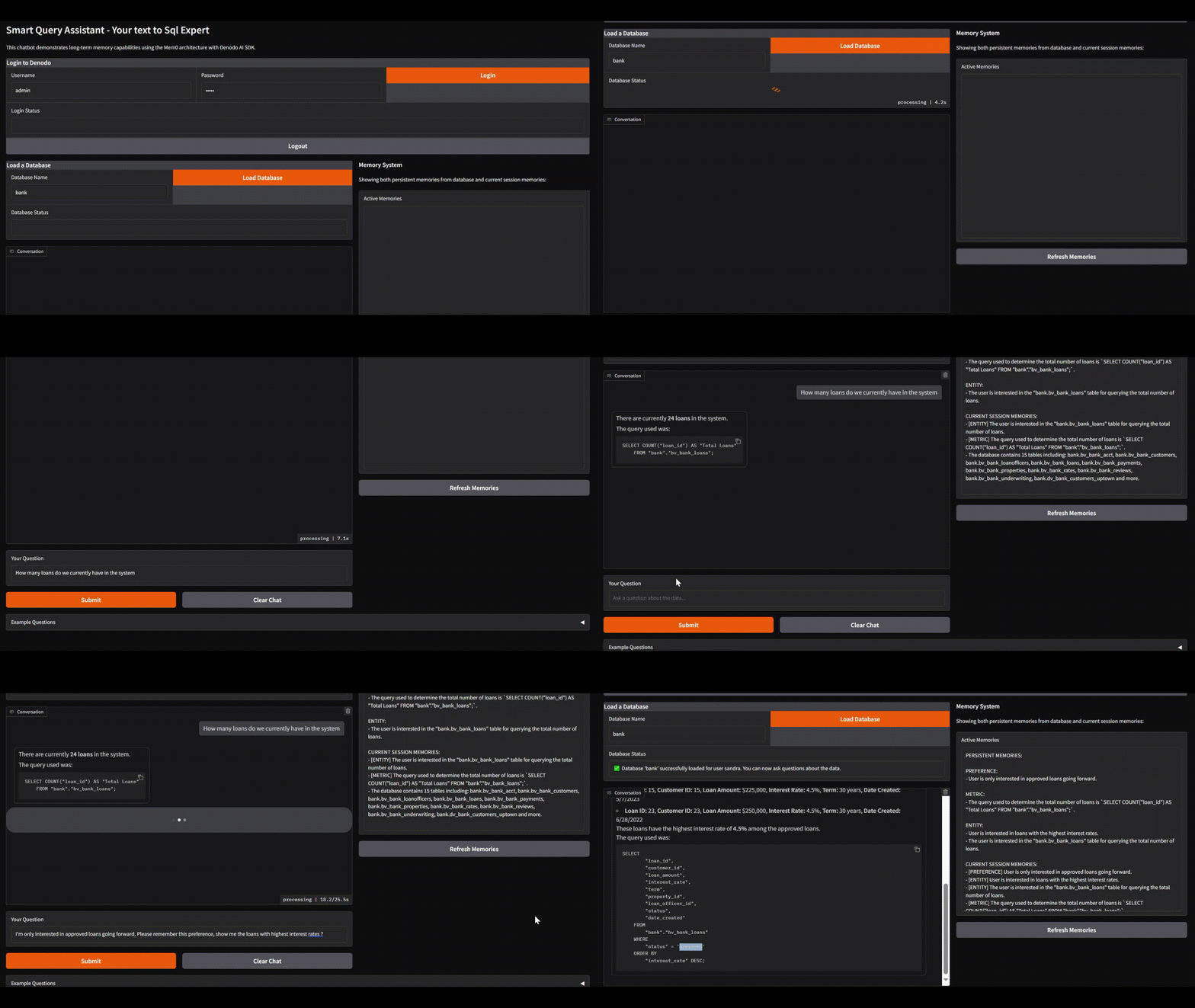
Sandra's First Session - Image by Author
Session Flow
- Authentication: Sandra logs in, establishing her identity.
- Database Connection: System loads bank database schema to understand tables and relationships.
- Initial Query: "How many loans do we currently have in the system?"
- Preference Setting: "I'm only interested in approved loans going forward."
- Follow-up Query: "Show me the loans with the highest interest rates."
- Memory Application: System automatically filters to show only approved loans with high rates.
Memory System in Action
The right panel shows the memory system working:
- Preference Memory: Stores "User is only interested in approved loans" and applies this filter automatically.
- Entity Memories: Tracks tables Sandra is interested in.
- Metric Memory: Records how loans were counted for consistency.
- Database Context: Maintains schema knowledge for accurate SQL generation.
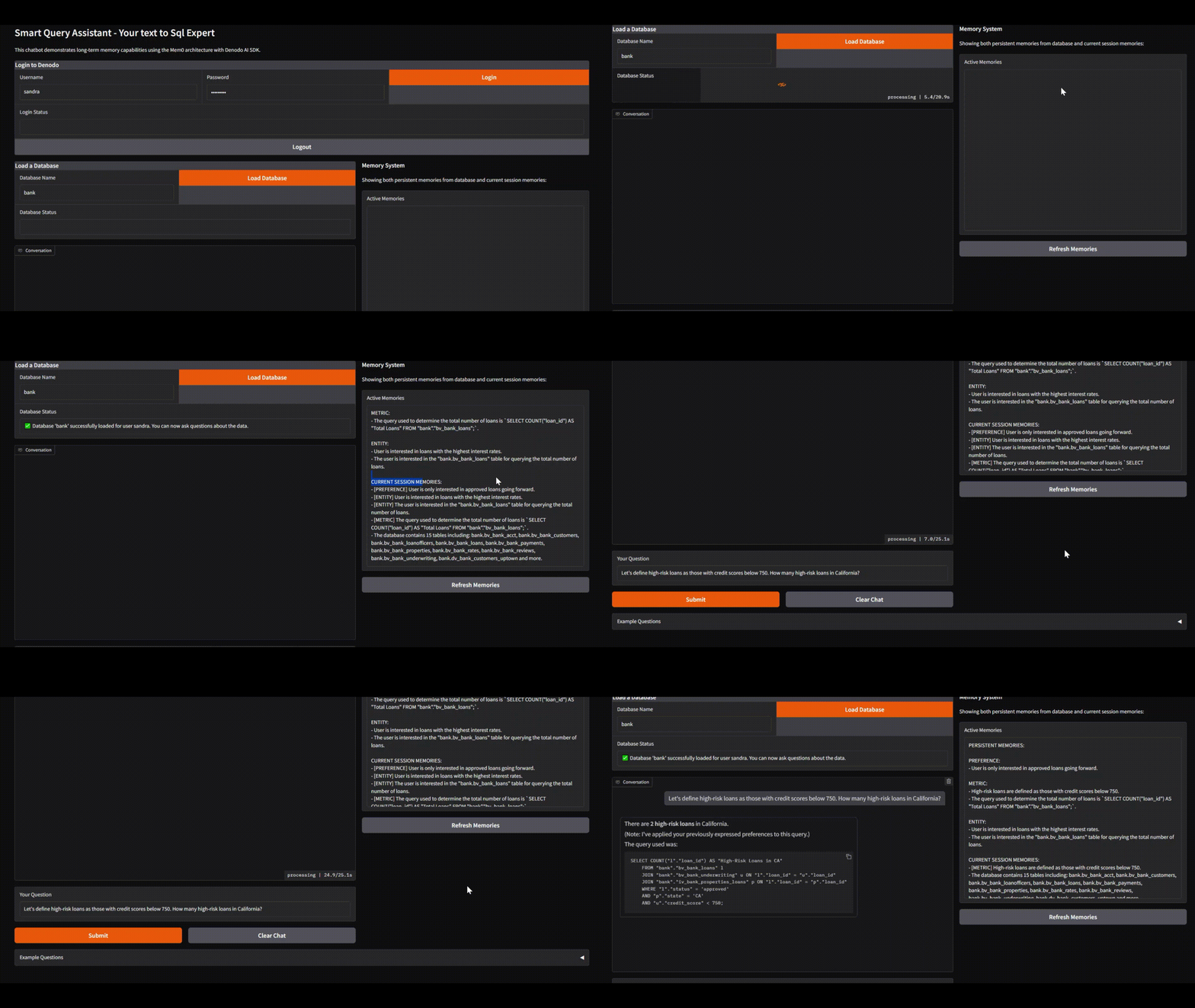
Sandra's Session 2 (3 days later) - Image by Author
When Sandra asks "Let's define high-risk loans as those with credit scores below 750. How many high-risk loans in California?", the system:
- Updates her metric definition (threshold from 650 to 750)
- Applies her approved loans preference automatically
- Generates SQL incorporating both preferences
- Acknowledges with "(Note: I've applied your previously expressed preferences)"
User 2: Alex (Property Manager)
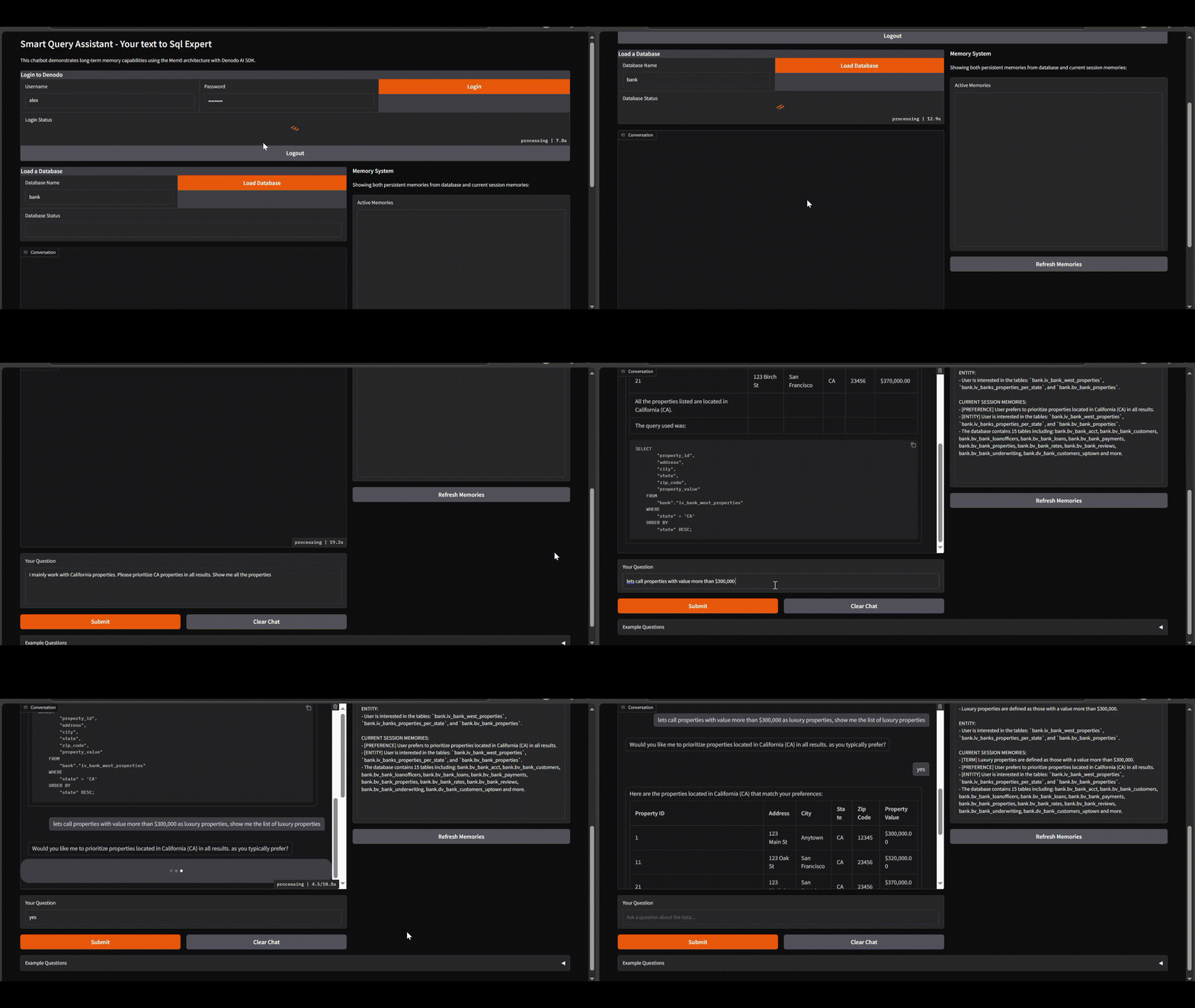
Alex's Session - Image by Author
This demonstration shows how the text2SQL agent with long-term memory creates a personalized experience for Property Manager Alex:
- Regional preference: Alex specifies he works with California properties, stored as a user preference.
- Custom terminology: Alex defines "luxury properties" as those valued over $300,000.
- Smart confirmation: When asked about luxury properties, system confirms whether to apply his California preference.
- Personalized results: After confirmation, system applies both preferences in the SQL query.
Performance Optimization for Production
For production deployment, consider these optimizations:
- Embedding cache: Store frequently used embeddings to reduce API calls
- Database indexing: Ensure proper vector and text indices on memory tables
- Batch processing: Update memories in batches rather than individually
- Connection pooling: Maintain a pool of database connections for better throughput
- Asynchronous execution: Process memory operations in the background when possible
Key Benefits for Text2SQL Agents
Adding long-term memory to text2SQL agents provides several advantages:
- Personalized experiences: Users don't need to repeat preferences in every session
- Terminology consistency: Custom definitions and abbreviations persist across sessions
- Reduced friction: Users can build on previous queries without reestablishing context
- Multi-user support: Each user maintains their own memory context
- More natural interactions: The agent remembers important details like humans do
Conclusion
Long-term memory transforms text2SQL agents from basic query translators into collaborative partners that learn user preferences over time. By implementing this memory system inspired by the Mem0 architecture, I have created a text2SQL agent that remembers what matters.
The system extracts, stores, and retrieves important facts from conversations, allowing agents to maintain context across sessions, remember user preferences, learn custom terminology, and provide increasingly personalized experiences.
While I have used Denodo as the data platform for this demonstration, the same architecture works equally well with Snowflake, Databricks, or traditional databases. The key innovation lies in the memory system itself, which remains consistent regardless of the underlying data platform.
Try It Yourself
Full source code and examples available on GitHub
Need Help Implementing This?
I offer consulting services for Text-to-SQL systems with long-term memory capabilities. Let's discuss your requirements.
Schedule a Consultation