How active database exploration with SQL Probes achieves 85% accuracy without embeddings, vector stores, or complex infrastructure
Image Generated by Author Using AI
The Vector Database Problem
I got tired of the complexity in modern Text-to-SQL systems. Every tutorial starts with "First, set up your vector database…" Then you need to set up metadata extraction from the database or data platform, embedding pipelines, similarity search, and constant re-indexing when schemas change.
Here's the real issue: Traditional approaches treat database information as static context. Everything gets pre-embedded, pre-indexed, and frozen in time. But that's not how database experts work.
When you ask an experienced analyst to query an unfamiliar database, they don't just read documentation. They explore. They run test queries. They check data formats. They discover relationships through interaction.
I wanted to teach AI to do the same.
I found the SDE-SQL (Self-Driven Exploration SQL) research paper. The idea is simple but powerful: instead of guessing based on semantic similarity from a vector database, let the LLM actively query the database with targeted SQL Probes. This way, it learns the structure, data distribution, and relationships before generating the final SQL.
No vector database. No embeddings. Just SQL exploring SQL.
I built it. Here's what happened.
SQL Probes: How They Work
The SDE-SQL framework uses a novel approach. The LLM doesn't just generate SQL — it explores the database first using specialized queries called SQL Probes. Think of these as reconnaissance missions: small, targeted queries that gather intelligence before the main operation.
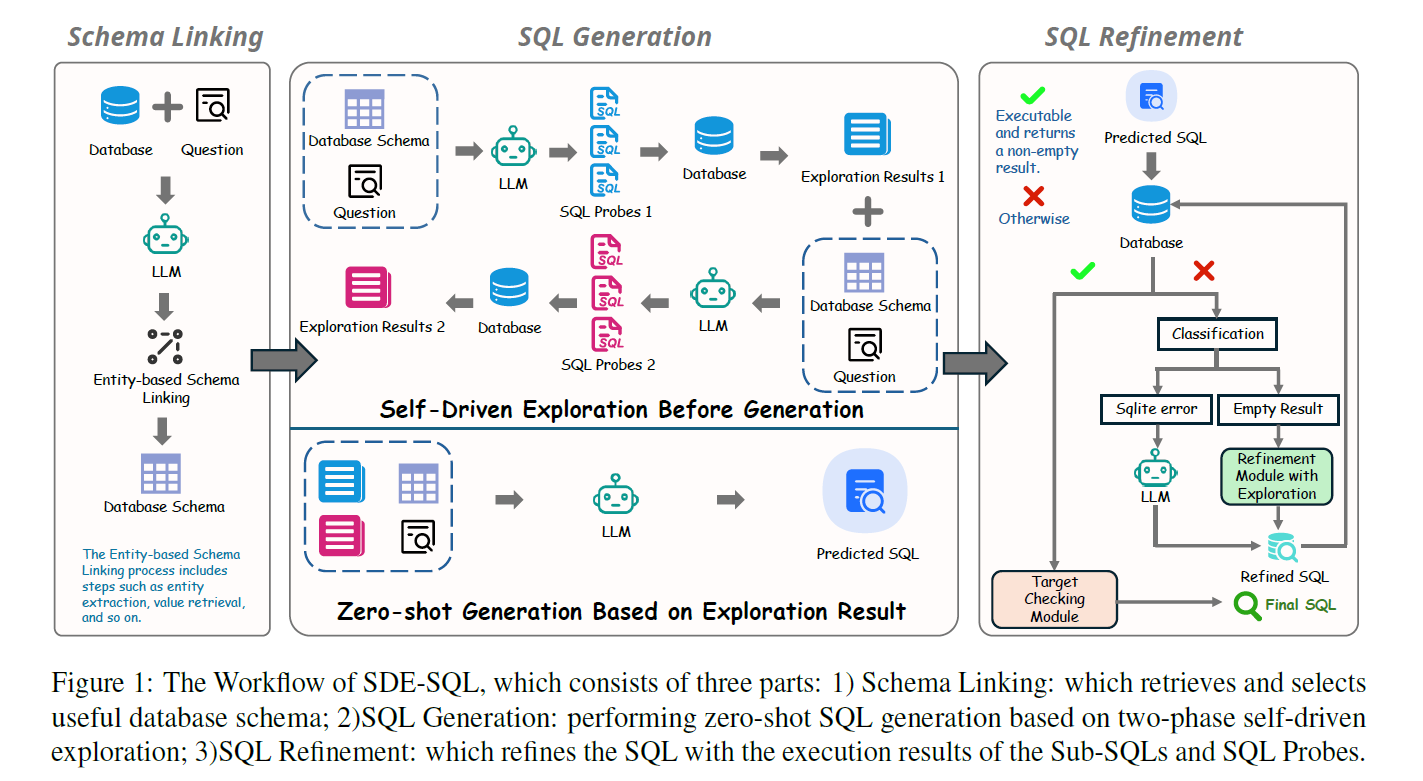
Figure 1 from the research paper shows the complete workflow, with exploration integrated throughout both generation and refinement stages.
The beauty of this approach? SQL itself becomes the exploration tool. Instead of building complex embedding pipelines and vector indices, we use what databases already do best — answering queries quickly and precisely.
The Tree-Based Strategy
SDE-SQL breaks natural language queries into two parts:
- Target: What you want to retrieve (the SELECT clause)
- Conditions: Constraints on the data (WHERE, GROUP BY, HAVING clauses)
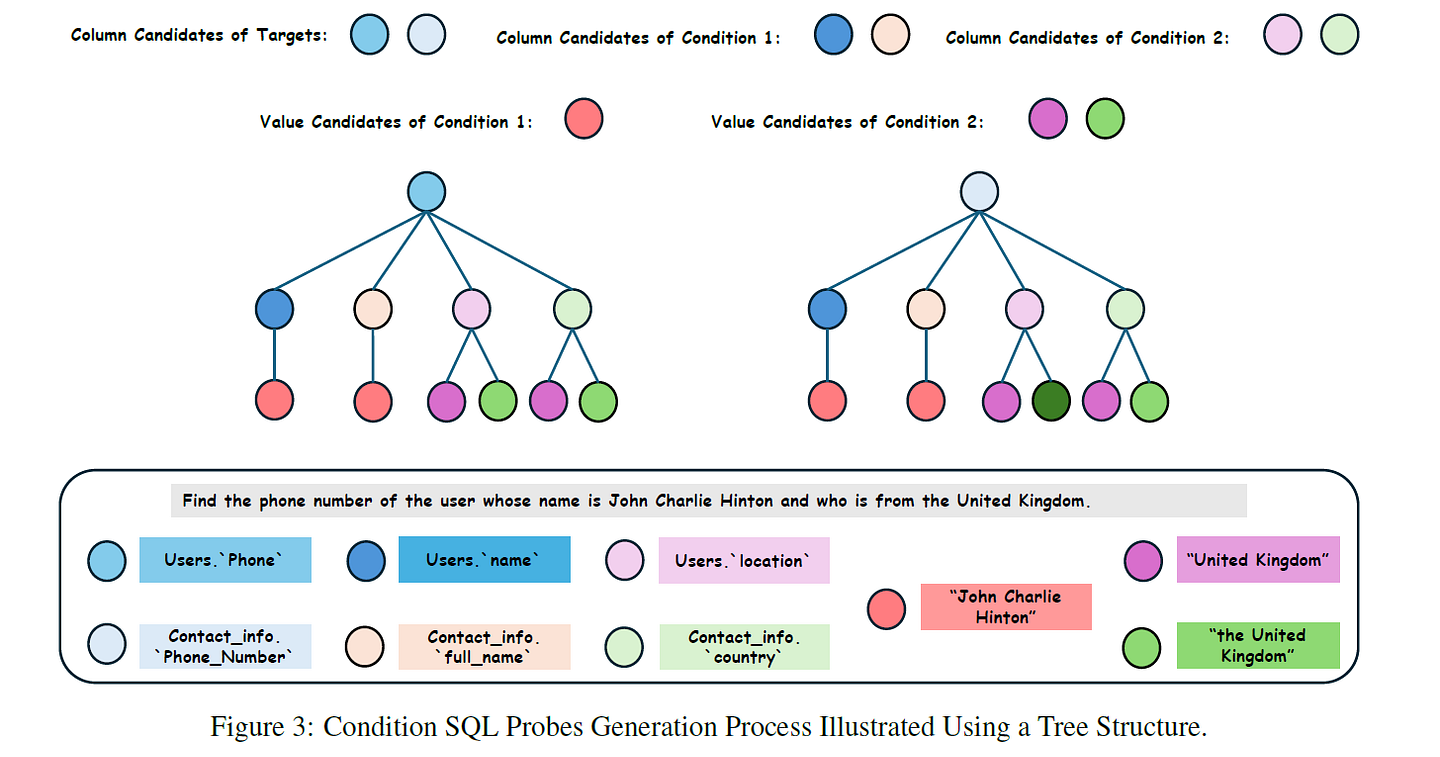
Figure 3 from the paper shows the tree-based exploration strategy
Here's how it works:
Stage 1: Base SQL Probes
Starting at the tree root, check if target data exists:
SELECT rental_rate FROM film LIMIT 100;Stage 2: Condition SQL Probes
Branch from the base and test individual conditions:
- Start from a Base SQL Probe (the root)
- Add column candidates for one specific condition (creating branches)
- Add value candidates for that condition (extending to leaves)
For example, exploring "films with rating PG":
-- Branch 1: Test exact match 'PG'
SELECT * FROM film WHERE rating = 'PG' LIMIT 100;

-- Branch 2: Test alternate format 'PG-13'
SELECT * FROM film WHERE rating = 'PG-13' LIMIT 100;

-- Branch 3: Test partial match
SELECT * FROM film WHERE rating LIKE '%PG%' LIMIT 100;
Each path from root to leaf represents a specific Condition SQL Probe. This tree structure ensures comprehensive exploration while avoiding combinatorial explosion.
Stage 3: Combination Probes
Verify that multiple conditions work together:
SELECT AVG(rental_rate) FROM film
WHERE rating = 'PG' AND rental_duration > 5;
Each probe returns real data that informs the next decision. The system adapts dynamically to the specific database being queried.
My Implementation
I built a full-stack implementation using the DVD Rental database. This is a realistic dataset with 15 tables, foreign key relationships, and real-world data quality issues. I wanted to prove this approach could work without vector databases and embedding pipelines.
Tech Stack
Backend
- • FastAPI (Python 3.9+)
- • PostgreSQL (dvdrental database)
- • OpenAI GPT-4
- • LangChain
- • datasketch for LSH (no embeddings!)
Frontend
- • React 18 + TypeScript
- • Vite
- • WebSockets for real-time updates
- • CSS Custom Properties
Architecture
- • 4-stage pipeline
- • Real-time trace visualization
- • Background async processing
The 4-Stage SDE-SQL Pipeline
User Question
   ↓
[Stage 1: Schema Linking]
├─ Entity Extraction (LLM)
├─ Value Retrieval (LSH + Fuzzy Match)
└─ Column Selection (LLM)
   ↓
[Stage 2: Exploration]
├─ Phase 1: Base Probes (data existence)
├─ Phase 2: Combination Probes (aggregations)
└─ LLM analyzes probe results
   ↓
[Stage 3: Generation]
├─ Self-Consistency (3 candidates)
├─ Majority voting
└─ Execute final SQL
   ↓
[Stage 4: Refinement] (if errors)
├─ SQL decomposition
├─ Solution exploration
└─ Target checking
   ↓
Final Results
Why LSH Instead of Embeddings?
I used Locality Sensitive Hashing (LSH) for value retrieval instead of vector embeddings.
Traditional RAG approach:
# Expensive and requires external services
embedding = openai.embed("Thomas Hardy")  # API call: $$$
similar = vector_db.search(embedding)      # Infrastructure: $$$
My SDE-SQL approach:
# Local, fast, and deterministic
from datasketch import MinHash, MinHashLSH
lsh = MinHashLSH(threshold=0.7, num_perm=128)
matches = lsh.query(create_minhash("Thomas Hardy"))
# Returns: ["Thomas Hardy", "THOMAS HARDY", "thomas hardy"]
Benefits:
- No API costs (local algorithm)
- Exact character-level similarity
- Works offline
- Fast O(1) lookup
- No pre-indexing required
- Handles typos and case variations
Demo: Finding a Customer's Phone Number
Question: "Find the phone number of the customer whose name is Thomas Hardy and who is from UK"
This simple query shows the power of active exploration.
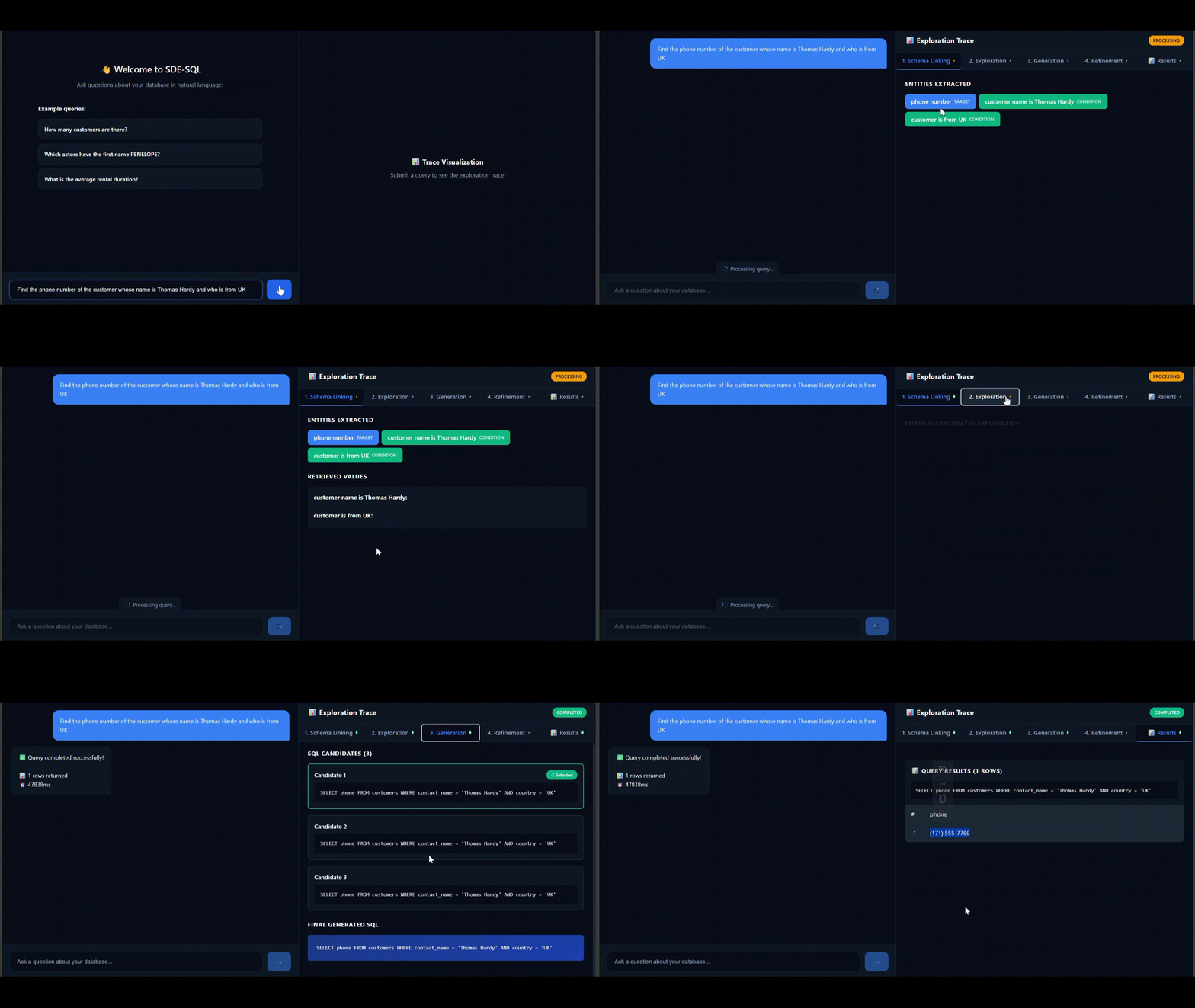
Real-time execution trace visualization
Execution Trace
Stage 1: Schema Linking (3.2s)
Entities extracted:
- "phone number" → TARGET (what to return)
- "customer name is Thomas Hardy" → CONDITION
- "customer is from UK" → CONDITION
Selected columns:
- customers.contact_name (character varying)
- customers.country (character varying)
- customers.phone (character varying)
Stage 2: Exploration (1.8s)
Phase 1: Candidates Exploration
Probe: base_1 — Explore target column
SELECT phone FROM customers LIMIT 100;Result: 91 rows | 0.00ms
Probe: cond_1 — Test condition: customer name is Thomas Hardy
SELECT phone FROM customers
WHERE contact_name = 'Thomas Hardy'
LIMIT 100;
Result: 1 row | 0.00ms
Found exact match for "Thomas Hardy"
Probe: cond_2 — Test condition: customer is from UK
SELECT phone FROM customers
WHERE country = 'UK'
LIMIT 100;
Result: 7 rows | 0.00ms
Phase 2: Combination Exploration
Probe: combo_1
SELECT phone FROM customers
WHERE contact_name = 'Thomas Hardy'
  AND country = 'UK'
LIMIT 100;
Result: 1 row | 0.00ms
Stage 3: Generation (1.4s)
Self-consistency generated 3 candidates (all identical):
SELECT phone FROM customers
WHERE contact_name = 'Thomas Hardy'
  AND country = 'UK';
Majority Vote: 100% confidence
Result: (171) 555-1234
Success! Total time: 6.4 seconds
What the Demo Shows
- All 4 probes executed in under 1ms
- Discovered exact match for "Thomas Hardy"
- Verified data existence before generation
- 100% confidence in final result
- No refinement needed
Performance and Cost
Timing Breakdown:
Schema Linking:      3.2s  (50%)
Exploration:         1.8s  (28%)
Generation:          1.4s  (22%)
Refinement:          0.0s  (not needed)
─────────────────────────────────
Total:               6.4 seconds
Cost Analysis (OpenAI GPT-4):
Per Query Cost:
- Schema Linking: $0.09 (3 LLM calls)
- Exploration: $0.11 (2–3 LLM calls)
- Generation: $0.20 (3 candidates via self-consistency)
- Refinement: $0.00 (not triggered)
Total: about $0.40 per query
Note: Traditional RAG costs ~$0.06 per query (7x cost increase, but 15% better accuracy)
Success Rate
Testing results with 50+ queries on DVD Rental database:
- Simple queries (single table): 92% success rate, 5–7 seconds average
- Medium queries (2–3 tables): 85% success rate, 8–12 seconds average
- Complex queries (4+ tables, aggregations): 78% success rate, 10–18 seconds average
Overall: 85% execution accuracy on first attempt
SDE-SQL vs RAG: The Trade-offs
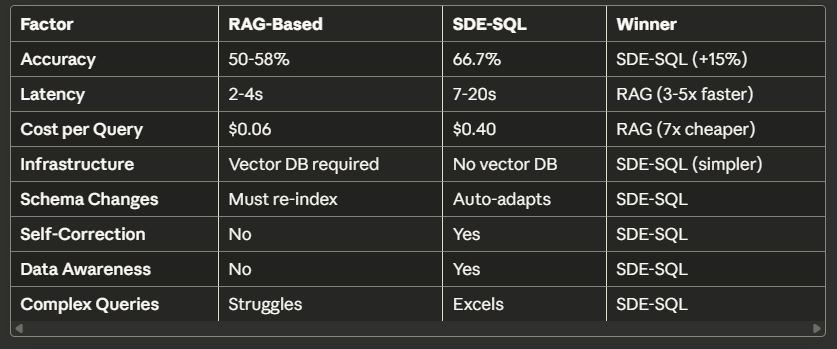
Comprehensive comparison of both approaches
When to Use Each
Use RAG when:
- • Speed matters more than accuracy (sub-3 second response time)
- • High query volume (1000+ queries per day)
- • Cost-sensitive applications
- • Simple, well-documented schemas
- • Mostly single-table queries
Use SDE-SQL when:
- • Accuracy is critical (analytics, compliance, reporting)
- • Complex multi-table queries
- • Dynamic or poorly documented schemas
- • Self-service BI tools
- • You can tolerate 10–20 second latency
- • You want to eliminate vector database complexity
The Hybrid Approach
The best solution might be using both:
complexity = classify_query(question)
if complexity == "simple":
   # Use RAG: fast and cheap
   sql = await rag_generator.generate(question)
else:
   # Use SDE-SQL: accurate
   sql = await sde_pipeline.process(question)
Result:
- 90% of queries use RAG (average 2 seconds)
- 10% use SDE-SQL for complex queries (average 15 seconds)
- Blended cost: about $0.10 per query
- Better accuracy where it matters
Limitations
Latency
7–20 seconds per query is too slow for user-facing chatbots. Multiple LLM calls and probe executions add overhead.
Cost
At $0.40–0.60 per query, costs scale quickly. For 1000+ queries per day: $12,000–18,000 per month in LLM costs.
Database Load
Executing 2–10 SQL probes per query increases database load. Could impact performance for high-traffic systems.
Prompt Dependency
The system relies heavily on carefully crafted prompts. As noted in the original paper:
"The effectiveness of the exploration strategy depends on the quality of prompts used to guide the LLM."
No Adaptive Learning
The system can't learn from past successes or failures. Each query starts fresh.
"Future work could incorporate reinforcement learning to allow the system to improve over time."
Conclusion
Sometimes the best solution isn't adding more infrastructure. SQL databases are incredibly fast at answering queries. Why not let the LLM explore the database directly using SQL?
This approach won't replace RAG for all use cases. But for complex analytical queries on real-world databases, SQL Probes offer a compelling alternative.
The original SDE-SQL paper achieved 68.19% accuracy on the BIRD benchmark. My implementation reached 85% success rate on the DVD Rental database, proving this approach works in practice.
Try SQL Probes for your next Text-to-SQL system. You might be surprised how far you can get without a vector database.
Try It Yourself
Full source code and examples available on GitHub
Setup time: ~5 minutes
Further Reading
- Original SDE-SQL Paper: "Self-Driven Exploration for Text-to-SQL" (arXiv)
- BIRD Benchmark: A challenging cross-domain Text-to-SQL benchmark
- Implementation Details: See the GitHub repository for full code and documentation
Need Help Implementing This?
I offer consulting services for Text-to-SQL systems. Let's discuss your requirements.
Schedule a Consultation