Scrambled warehouse views, business docs, a YAML ontology, retrieval, and a 30 question eval across three models
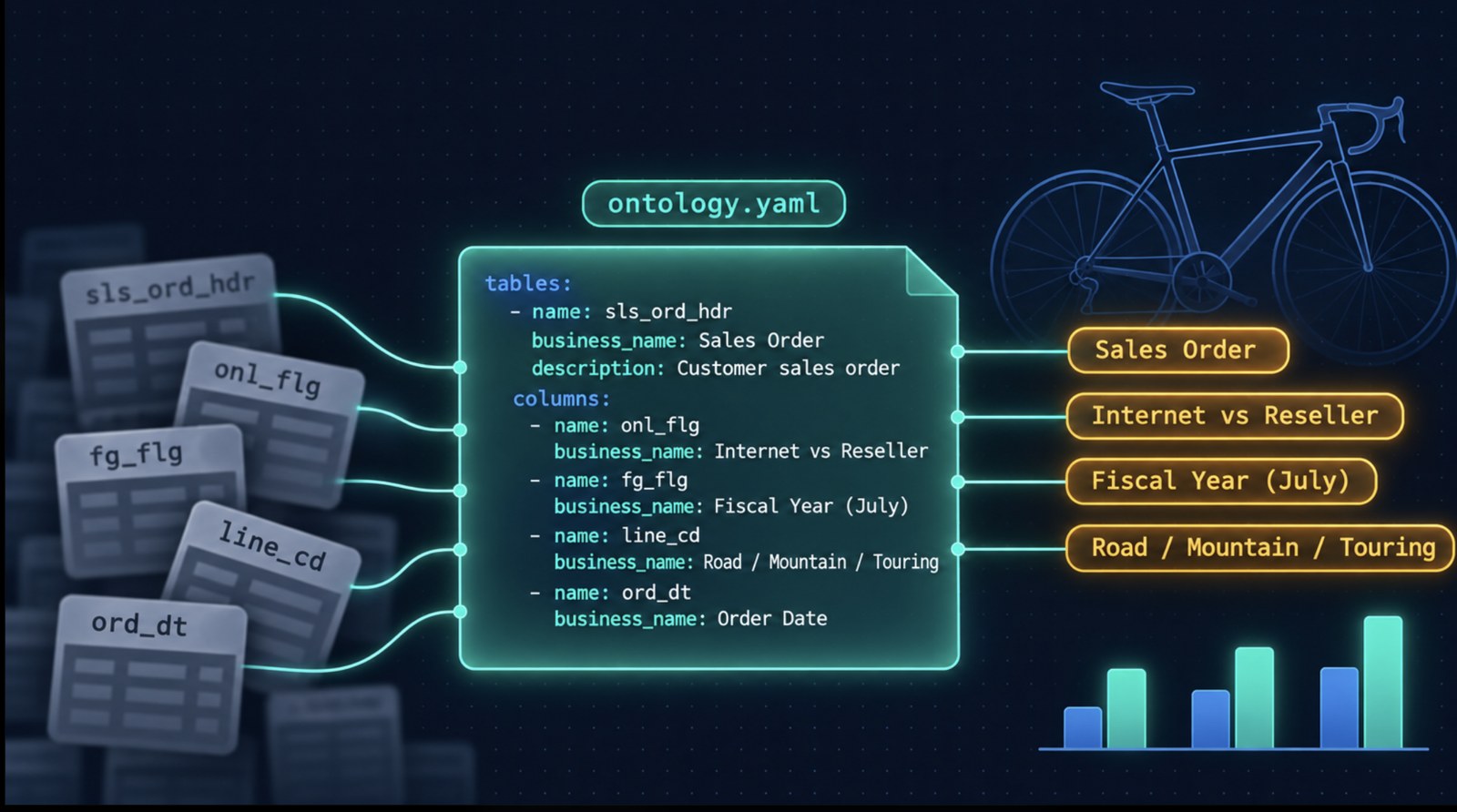
I have used AdventureWorks for almost a decade on sample data engineering and analytics projects. I could write the joins in my sleep. I still did not fully understand the business concepts behind the tables: product line codes, a fiscal year that starts in July, internet versus reseller, finished goods versus components, store specialty buried in survey XML.
So I built an ontology for it: cryptic warehouse names on one side, business language and docs on the other. I asked the same 30 questions with and without that ontology across three models. Every model with the ontology beat every model without it, and the weakest model gained the most.
This is a ground level build. It covers the basics of creating an ontology, with enough eval to trust the pattern. To keep it easy to follow, I built everything in plain Python, YAML and SQL. No ontology framework, no graph database. The only infrastructure is Postgres, which is open source. Later I map each piece to what you would use at enterprise scale, Neo4j included.
Why a schema alone is not enough
AdventureWorks is a classic OLTP sample, and the clean Microsoft names are a problem for Text-to-SQL evals. Models have memorized SalesOrderHeader.OnlineOrderFlag. Give them those names and they answer from memory, so you never learn what your ontology actually added.
I load the real tables into Postgres, then expose a scrambled wh schema: thirty three views, same data, cryptic names.
CREATE OR REPLACE VIEW wh.sls_ord_hdr AS
SELECT
  salesorderid     AS ord_id,
  orderdate        AS ord_dt,
  status           AS stat_cd,
  onlineorderflag  AS onl_flg,
  subtotal         AS sub_amt,
  totaldue         AS net_amt,
  ...
onlineorderflag becomes onl_flg. finishedgoodsflag becomes fg_flg. The mapping file is for humans debugging gold SQL. It never goes to the LLM. Real warehouses look like this, and your Text-to-SQL stack has to survive it.
Load the data, then profile it
- Start Postgres 16 (
docker compose up -din the repo). - Run
scripts/load_adventureworks.sh. It pulls the official AdventureWorks 2014 CSVs and the MIT Postgres port (linked in Resources at the end). - Apply
sql/01_create_wh_views.sqlto create the scrambled layer. - Run
scripts/profile_schema.py. It readsinformation_schema, samples values, and writesartifacts/schema_profile.json.
The profile records column types, distinct counts, sample values (stat_cd is 1 to 6), and likely join keys. That file is the structured half of the ontology input.
Add the docs the tables cannot tell you
The other half lives in docs/: markdown for company rules, product codes, and store surveys. Sources are Microsoft Learn pages plus text and XML exported from the loaded database. docs/SOURCES.md lists every link.
These docs hold rules the columns never state:
- Fiscal year starts July 1. FY2024 runs from 2023-07-01 to 2024-06-30.
- Internet orders have
onl_flg = TRUE. Reseller orders haveonl_flg = FALSE. - Finished goods have
fg_flg = TRUE. - Product line codes: R Road, M Mountain, T Touring, S Standard.
Without those rules, "how many internet orders" is a guessing game over cryptic flags. One clarifying point for the needs docs questions later: doc knowledge becomes ontology rules, and the answer is still SQL on the warehouse. The fiscal year rule comes from company_overview.md and turns into a date filter on ord_dt. Pure document Q&A is a RAG problem and is out of scope here.
Write the ontology as YAML
One file does the work: ontology/ontology.yaml. Six sections, each answering something column names cannot.
Entities (24). Business names mapped to tables and columns.
name: SalesOrder
description: A customer purchase order with dates, status, channel flag, and totals.
table: wh.sls_ord_hdr
primary_key: ord_id
attributes:
  - name: online_order_flag
    column: onl_flg
  - name: subtotal
    column: sub_amt
synonyms: [order, sales order, purchase, transaction]
Relationships (21). Join paths with exact keys. Provenance is schema because they came from the profile.
name: has_lines
from: SalesOrder
to: SalesOrderLine
join:
  left: wh.sls_ord_hdr.ord_id
  right: wh.sls_ord_dtl.ord_id
Rules (8). The docs section. Each rule carries a sql_hint, synonyms, and the source file.
name: internet_vs_reseller
description: Online/internet orders have onl_flg = true. Reseller orders have onl_flg = false.
sql_hint: onl_flg = TRUE  -- internet; onl_flg = FALSE -- reseller
provenance: docs/business/kpi_definitions.md
Metrics (4). What "revenue" means. Line sales is unit_prc * qty * (1 - disc_pct). Order subtotal is the header sub_amt. Pick one and stick to it.
Value meanings (9). Decode coded columns. line_cd R/M/T/S means Road, Mountain, Touring, Standard.
Synonyms index (14). Global lookup from user language to ontology terms. "internet" also matches "online", "web", "online order".
You can draft a first pass with scripts/draft_ontology.py, which packs the profile and docs into a prompt for whichever LLM your .env names. Review the draft, then curate by hand. Synonyms should be business language, not copies of your eval questions.
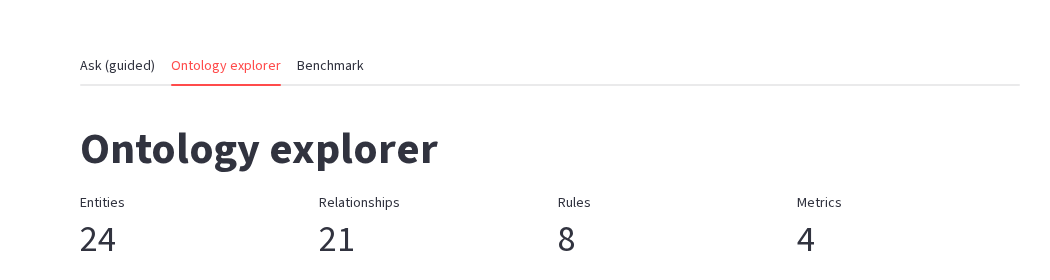
Ontology explorer in the Streamlit app: 24 entities, 21 relationships, 8 rules, 4 metrics.
Retrieve a slice, do not dump the whole file
The full YAML is about 18.8k characters, and a modern model could swallow all of it. I still retrieve a slice per question: company ontologies have hundreds of entities, irrelevant tables invite wrong joins, deterministic scores are easy to show in a UI, and retrieval itself is cheap.
How it works in scripts/ask.py:
- Tokenize the question with light stemming, and drop stopwords.
- Expand through the synonyms index, but only for distinctive words. "Sales" cannot drag in half the ontology.
- Score every entity with IDF weighting. Rare words count more than common ones, and name hits beat synonym hits.
- Keep top seeds. Anything below 40% of the best score is cut, with a max of 5 seeds.
- A multi hop BFS fills join bridges, up to 3 hops.
- Rules, metrics, and value meanings make the cut only when the question hits their distinctive words.
For "How many internet sales orders are there?" the slice is just SalesOrder plus the internet_vs_reseller rule. An earlier, noisier retrieval pulled eight entities, including PurchaseOrder and WorkOrder. Tighter is better.
A typical ontology prompt is 3.5k to 4.5k characters, against about 5.5k for the schema only baseline. Smaller prompt, higher accuracy. Keyword retrieval is still brittle with paraphrases: say "ecommerce" when that phrase is missing from synonyms, and you miss. Production moves to embeddings, an LLM reranker, and graph traversal. That is the bridge into the enterprise stack below.
Prompt the model, then run SQL safely
prompts/ask_sql.md fills in the question, the ontology slice as YAML, and schema hints for only the tables in the slice. The model returns SQL only.
scripts/llm.py talks to Ollama (local or Cloud), Gemini, OpenAI, or Anthropic through .env. Swap the key, keep the ontology. The stack is model agnostic on purpose.
Before anything hits Postgres, the SQL must be a single SELECT or WITH ... SELECT. It runs on a read only session with a 15 second statement_timeout.
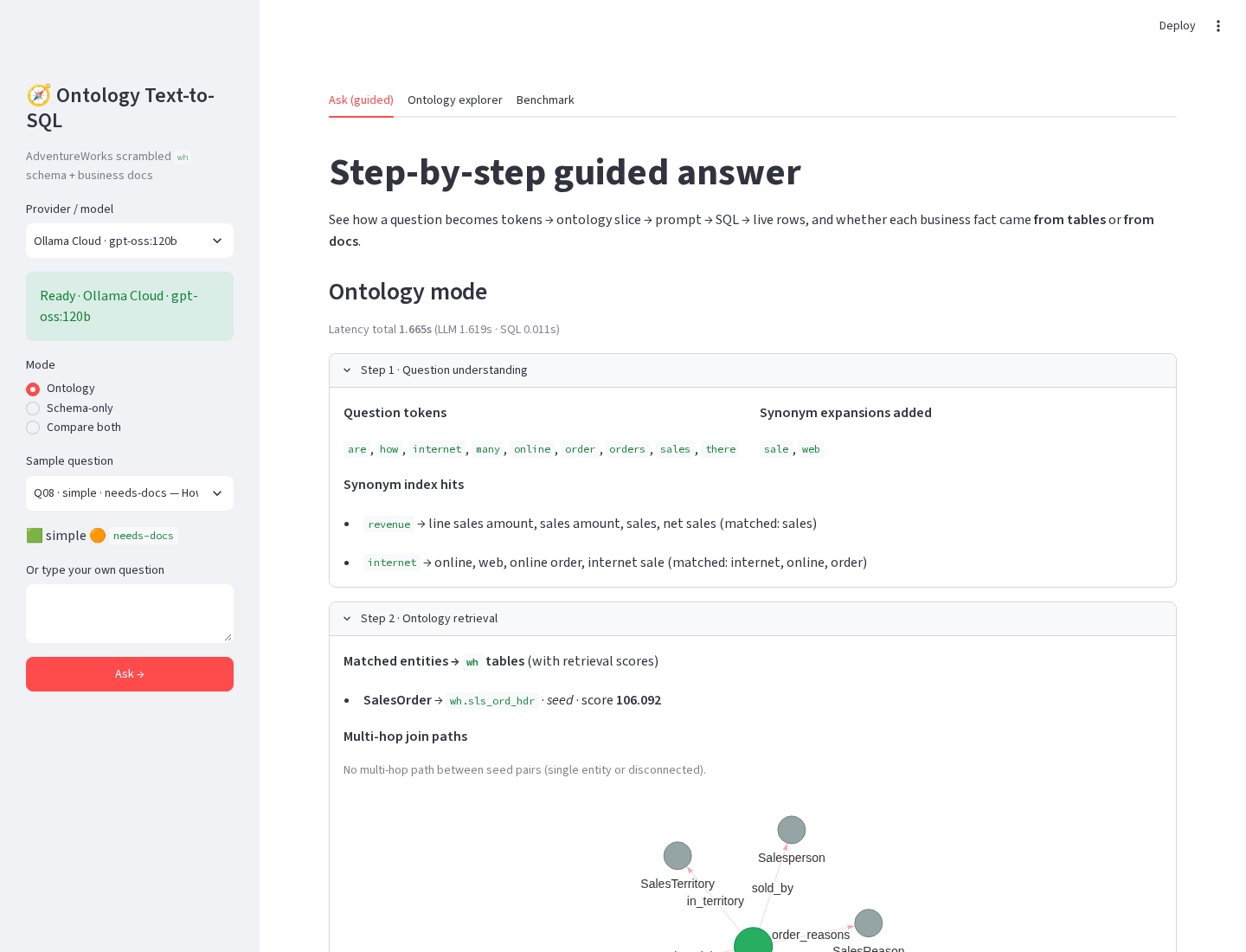
Guided ask for Q08. Synonym expansion turns "internet" into online and web. Retrieval lands on SalesOrder → wh.sls_ord_hdr.
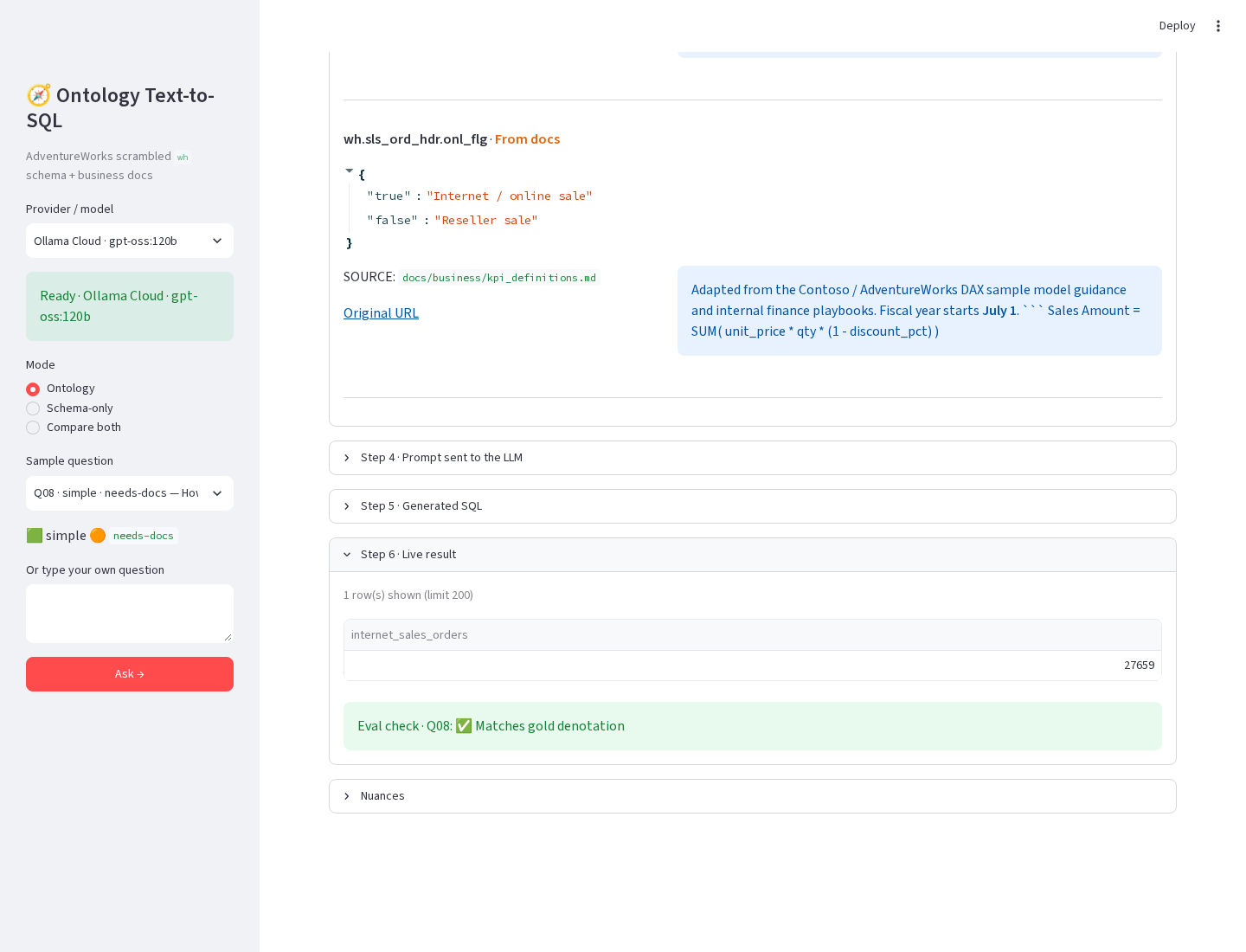
Live result for Q08. Value meaning for onl_flg comes from docs. Eval check matches gold.
Evaluate with denotation, not SQL text
I wrote thirty questions: ten simple, twelve medium, eight complex, tagged as 15 structured, 7 needs docs, and 8 both. Gold SQL is hand written against wh, with result rows frozen in eval/gold_results/.
Scoring compares result sets, not SQL strings, so two different queries that return the same data both pass. The tiers in eval/COMPARISON.md cover full bag match, projection match, and numeric bag match. Each model runs schema only and with the ontology.
What the numbers say
Three models, temperature 0, same 30 questions.
| Model | Schema only | With ontology | Gain |
|---|---|---|---|
| Gemini 2.5 Flash | 53% | 87% | +34 pp |
| gpt-oss 120B | 33% | 73% | +40 pp |
| Nemotron 3 Super | 47% | 70% | +23 pp |
Gemini's run used an earlier retrieval version; the Ollama models used the tighter IDF retrieval above. The headline holds either way.
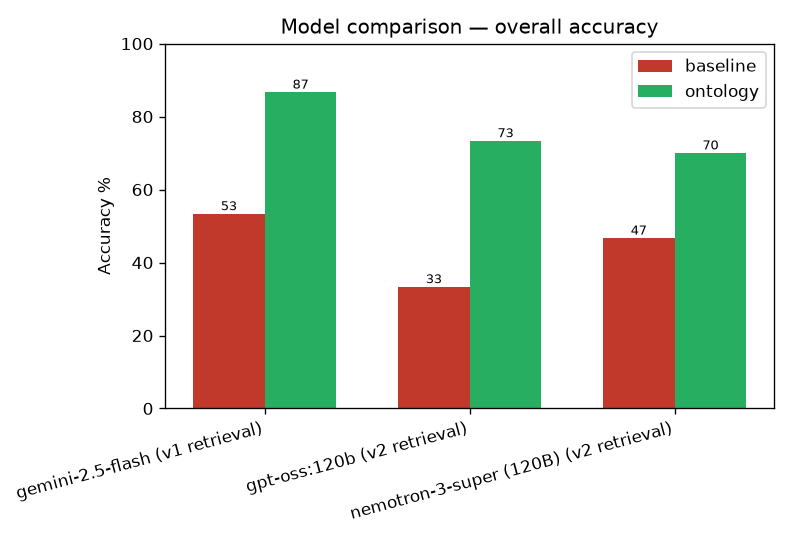
Overall accuracy. Green is ontology. Red is schema only. Every green bar beats every red bar.
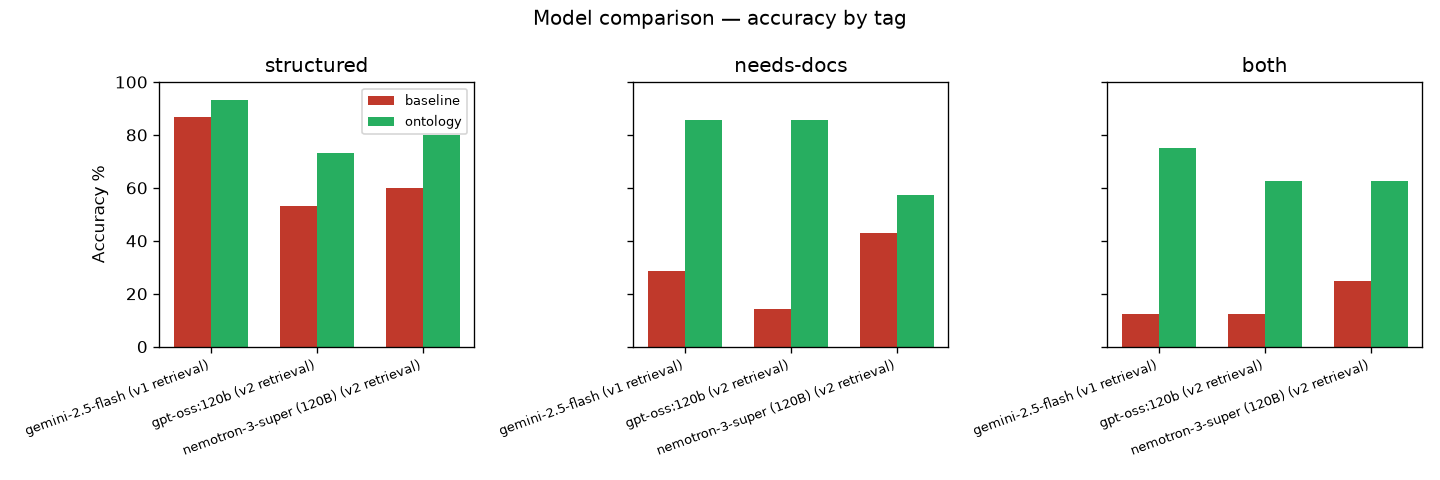
By tag. The biggest lift is on needs docs and both, where business rules matter.
Q22, Q26, and Q27 still fail for every model. Q26 needs xpath over store survey XML for Road specialty stores. The ontology says the survey exists; it does not teach the XML shape. That is an ontology gap, not a model gap. Fix the YAML before you chase a bigger model.
Try it in the UI
streamlit run app/app.pyThe Ask tab walks one question through tokens, entity scores, multi hop bridges, doc provenance, the prompt, the SQL, and the live rows. Compare both modes when you want the baseline guess next to the ontology answer.
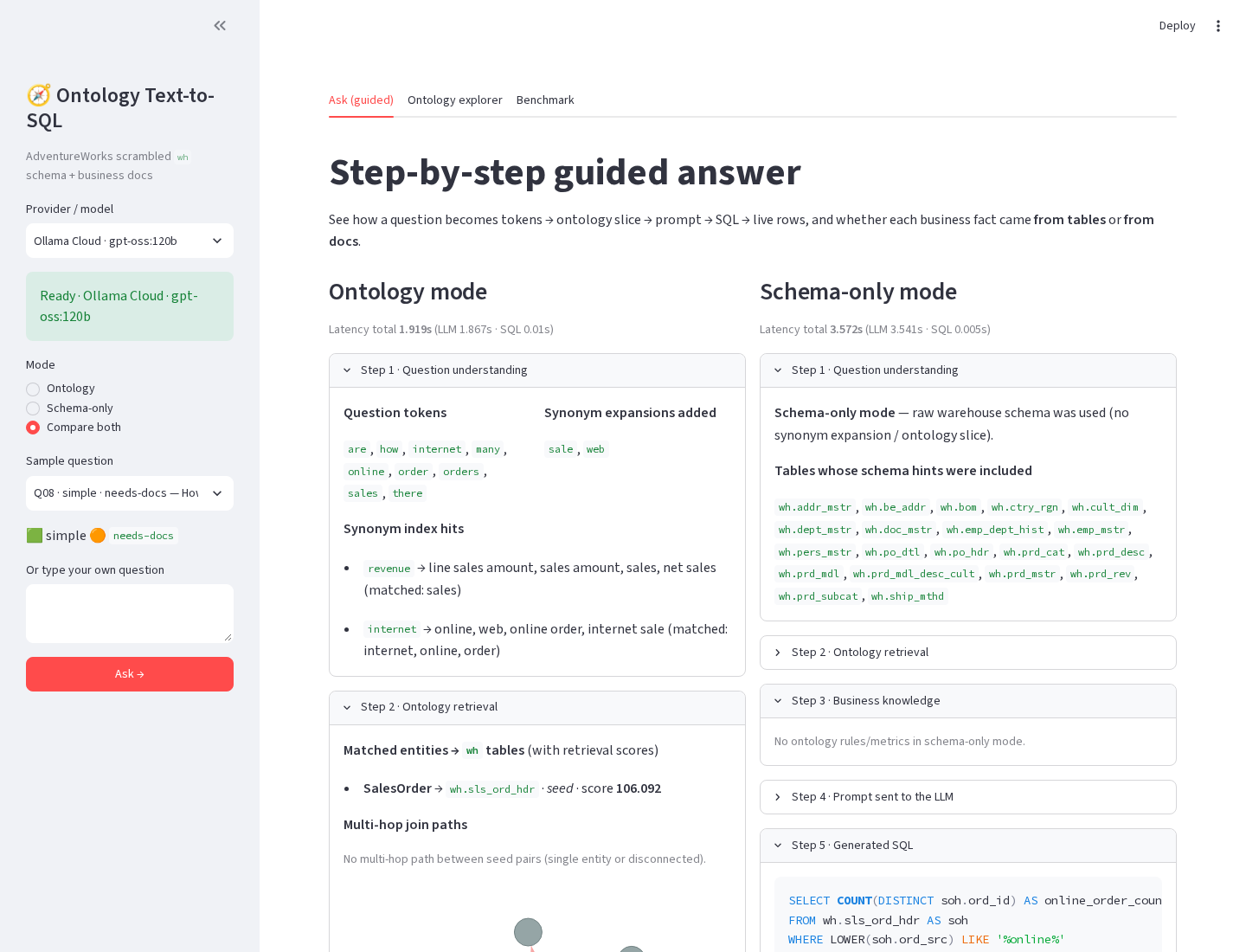
Compare both. Ontology mode retrieves one entity. Schema only mode dumps schema hints for 21 tables and guesses a wrong filter on ord_src.
Taking this to enterprise scale
If you bring this pattern into a real company, keep the same mental model and upgrade the storage around it. YAML on disk is a teaching tool. At scale you need graph storage for relationships, a semantic layer for metrics, a catalog for owners, and CI that catches ontology regressions.
| This repo | Enterprise choice | Why |
|---|---|---|
ontology.yaml on disk | Neo4j (Cypher) as the default; Memgraph for lower latency; Apache AGE inside Postgres; HelixDB for graph plus native vector and full text | Relationships stop fitting flat files. Neo4j also has GraphRAG and an LLM Knowledge Graph Builder. Kuzu was a strong embedded option, but Apple acquired it in Oct 2025 and the repo was archived the next day, so I would not start a new project on it. |
| Rules and value meanings in YAML | Optional OWL/RDF/SHACL with Apache Jena, GraphDB, or Stardog | Use formal ontologies when you need reasoning, constraint validation, and heavy governance. Most Text-to-SQL teams do not need that on day one. |
| Metrics block in the ontology | dbt Semantic Layer / MetricFlow, Cube, or AtScale | Metrics belong in a semantic layer that compiles to warehouse SQL. The ontology should hold meaning, joins, and rules, not become your only metric store. |
| Keyword + IDF retrieval | Hybrid: embeddings + keywords + graph traversal, with pgvector or the graph DB's vector index, plus an LLM reranker | Paraphrases break pure lexical matching. Hybrid retrieval is the production default. |
Hand curated docs/ markdown | LLM extraction from PDFs, wikis, and Confluence into candidate rules, with human review and provenance | Scale the drafting, not the approval. Every rule still needs a source link. |
| Manual schema profile | DataHub or OpenMetadata | Catalogs give you tables, owners, and lineage as the structured input to the ontology. |
evaluate.py on demand | Growing gold set, CI on every ontology change, ontology versioned like code | If the ontology can ship without an eval gate, it will drift. |
My advice is boring on purpose. Start with Postgres plus curated YAML until the joins and rules hurt. Move relationships into Neo4j or AGE when multi hop retrieval becomes the bottleneck. Put metrics in dbt MetricFlow, Cube, or AtScale so "revenue" means one thing in BI and in the agent. Add OWL only if you truly need reasoning. Keep Helix Foundry on the shortlist when you want ontology drafting with graph plus vector storage in one place.
Resources
- Repo: MKcodeshere/adventureworks-ontology
- Postgres port: lorint/AdventureWorks-for-Postgres (MIT)
- Microsoft AdventureWorks OLTP sample: sql-server-samples releases
- Ontology and agent inspiration: HelixDB helix-foundry
Build the ontology. Measure it. Then decide what your warehouse still refuses to tell you.
Need Help Implementing This?
I offer consulting services for Text-to-SQL systems. Let's discuss your requirements.
Schedule a Consultation